
Why Your Laptop Battery Drains Faster Over Time-and What's Actually Happening Inside

Key Takeaways
- Lithium-ion batteries degrade through electrochemical wear that begins with the very first charge cycle.
- Heat is the single biggest accelerator of battery aging - more so than how often you charge.
- Keeping a battery between roughly 20% and 80% charge can slow capacity loss over time.
- Most laptop batteries are rated for 300-500 full charge cycles before reaching 80% of original capacity.
- Degradation is permanent - no software update or charging trick can restore lost chemical capacity.
- Modern operating systems and battery management firmware can help users monitor and manage degradation.
Battery Degradation
Battery degradation is the gradual, irreversible loss of a battery's ability to hold a full charge. Over time, the chemical reactions inside a lithium-ion battery become less efficient, reducing the total energy it can store and deliver. This is why a laptop that once lasted six hours on a single charge might only manage three or four hours after a couple of years of normal use.
Degradation is primarily measured as a decline in "state of health" (SOH) - the ratio of a battery's current maximum capacity to its original design capacity, expressed as a percentage.
The Chemistry Behind Every Charge
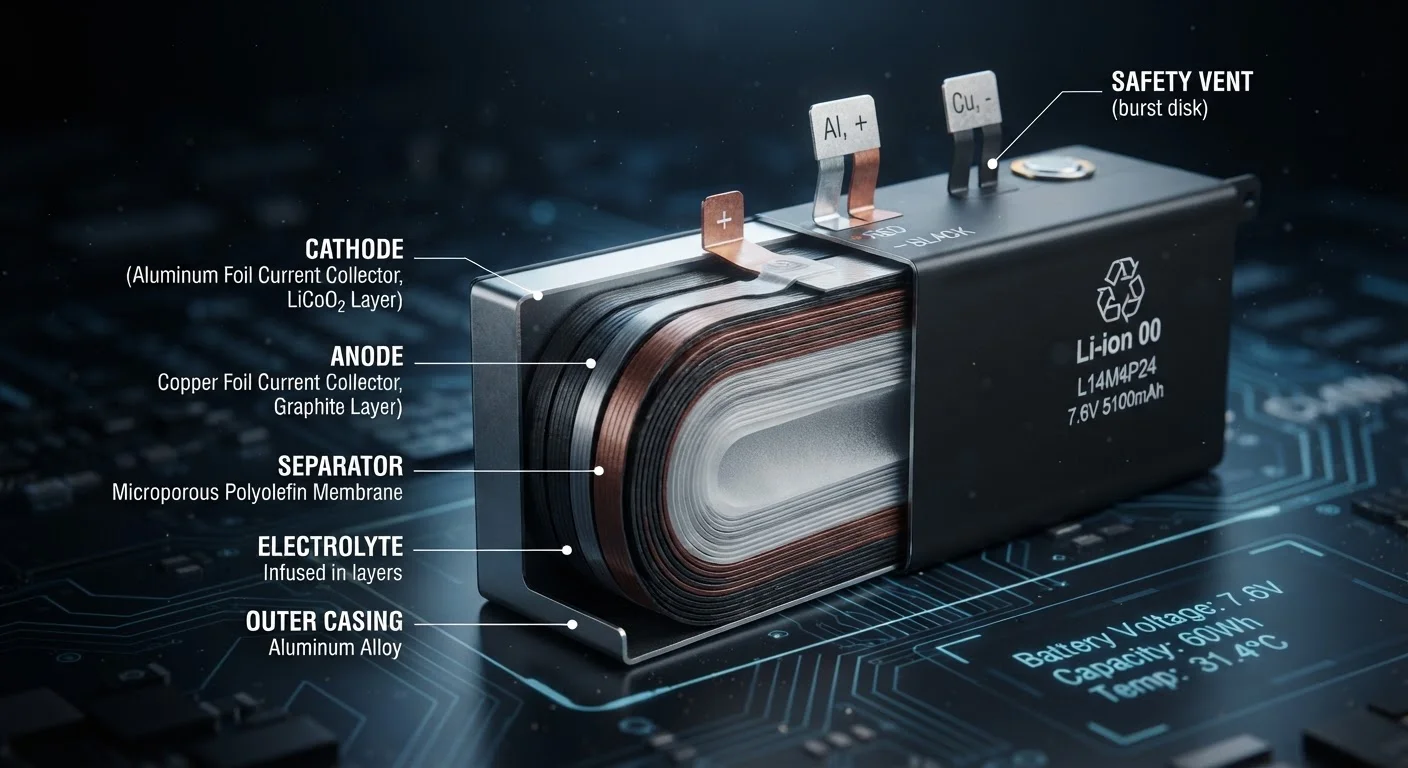
Laptop batteries almost universally use lithium-ion (Li-ion) chemistry, and understanding the basics of how they work explains why degradation is inevitable. Inside each cell, lithium ions shuttle between two electrodes - a graphite anode and a metal oxide cathode - through a liquid electrolyte. When you charge the battery, ions move to the anode; when the battery discharges, they flow back to the cathode, releasing energy along the way.
The problem is that this shuttling is not perfectly clean. With each cycle, tiny amounts of lithium become trapped in structures that form on the anode - a layer called the solid electrolyte interphase (SEI). Over time, the SEI thickens, more lithium is immobilized, and the battery simply has less active material to work with. The result is a measurable, permanent drop in capacity that no software fix can undo.
300-500
Typical full charge cycles before 80% capacity
Most lithium-ion laptop battery specifications from major manufacturers cite this range as the rated cycle life to 80% state of health.
~20%
Capacity lost in first year of average use
Battery aging research, including studies published in journals of electrochemical science, consistently finds measurable capacity decline within the first year under typical consumer conditions.
25°C
Optimal storage temperature for Li-ion cells
Electrochemical research identifies room temperature (approximately 25°C / 77°F) as the sweet spot that minimizes both self-discharge and chemical degradation during storage.
Why Heat Is the Real Enemy
Of all the variables that accelerate battery aging, heat is by far the most damaging. Elevated temperatures speed up the chemical side-reactions that trap lithium and break down the electrolyte, compounding capacity loss far faster than normal cycling alone. A battery running consistently hot - due to heavy workloads, a blocked vent, or a sun-baked surface - can lose meaningful capacity well ahead of what charge cycles alone would predict.
Cold temperatures are less damaging to long-term chemistry, but they do temporarily reduce performance - a battery may report lower charge in freezing conditions only to recover somewhat once warmed. For everyday users, the practical implication is clear: keeping a laptop cool during operation and storage is one of the most impactful habits for extending battery life. This parallels how physical wear works in other contexts - sustained stress compounds over time. For a broader look at managing wear across your devices, see our guide to long-term electronics care.
Keep Your Laptop Lifted and Ventilated
Using a laptop stand or ensuring the bottom vents are clear of soft surfaces like beds and cushions can meaningfully reduce operating temperatures. Cooler operation is one of the most effective and effortless ways to slow battery aging over the long term.
Charge Habits That Actually Matter
A common piece of advice is to keep a lithium-ion battery between 20% and 80% state of charge, avoiding both full depletion and prolonged periods at 100%. There is real chemistry behind this: lithium-ion cells experience greater structural stress at the extremes of their charge range. Keeping the battery in a middle range reduces the mechanical strain on electrode materials caused by lithium ions expanding and contracting the cell structure.
That said, the practical impact of charge habits is secondary to heat management for most users. Occasional full charges or discharges are not catastrophic - manufacturers design batteries to handle real-world use. The concern is sustained, repeated exposure to extremes, not the occasional exception.
The 20-80% Rule Is a Guideline, Not a Mandate
Staying between 20% and 80% charge can reduce cumulative stress on battery electrodes, but modern laptop batteries are engineered with some buffer built into their rated range. Occasionally charging to 100% for travel or discharging fully during heavy use will not cause immediate harm - the benefit of the 20-80% practice is cumulative over many cycles.
It's worth understanding that battery capacity loss shares a structural similarity with other forms of asset degradation - just as a vehicle's value declines in ways that are partly predictable and partly driven by conditions of use (see how car depreciation works), a battery's health declines on a trajectory shaped by both time and usage patterns.
Reading the Signs and Managing Expectations
Both Windows and macOS include built-in tools that report battery health. On macOS, the System Information panel shows cycle count and condition. On Windows, running powercfg /batteryreport in the command prompt generates a detailed report showing design capacity versus current full-charge capacity - a direct measure of how much the battery has degraded.
A battery at 80% health after a few years of regular use is performing within normal parameters. Degradation below 60-70% of original capacity is typically where users notice a significant impact on daily usability, and replacement becomes worth considering. Because degradation is permanent and physical, no calibration routine or third-party app reverses it - those tools can improve the accuracy of charge percentage estimates, but cannot restore lost electrochemical capacity.